エピソード

  • Workplace Ergonomics at Home main episode for 2026-07-27
    2026/08/24
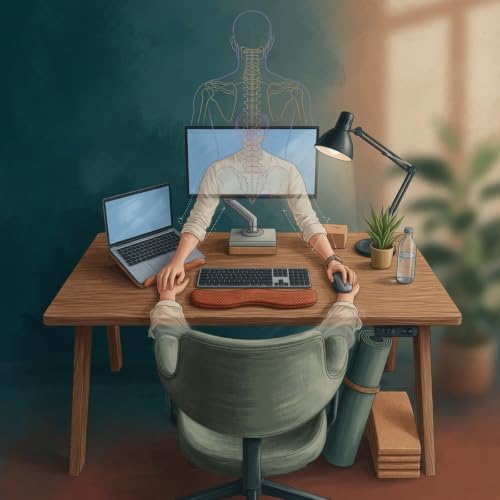
    In this episode of Workplace Ergonomics at Home, Zara shares practical hacks tailored for hybrid workers stuck with kitchen tables and hand-me-down desks. Instead of generic posture tips, she breaks down three targeted adjustments that tackle real pain points like neck tightness and wrist aches without waiting for employer support. Listeners learn to test changes methodically, tracking what reduces spinal and hand strain while fitting tight spaces and budgets.

    Key takeaways include:
    - Raising your monitor with books or a crate so the top aligns with eye level to ease forward head tilt.
    - Adding a rolled towel or cushion to your chair for lower back curve support during long sessions.
    - Positioning your keyboard for 90-degree elbows, using trays or lap desks if needed, and considering a monitor arm for flexible setups.

    These small fixes address root causes like low screens pulling the body out of alignment, turning trial-and-error into a quick weekly checklist.

    📩 Have questions or want to share your experience? Reach out at workplace@senseofthisshit.com.
    💛 Join Our Supporters Club ($3 a month) 💛 Ad-free listening + early episodes — help keep independent media alive. Click Here: https://www.spreaker.com/podca...
    続きを読む 一部表示
    6 分
  • Workplace Ergonomics at Home Fixes for Neck Back Wrist Pain
    2026/08/17
    In this episode of Workplace Ergonomics at Home, we explore practical fixes for neck, back, and wrist pain that plague remote workers and freelancers when home setups fall short. From monitors perched too low to chairs that force slouching, small mismatches compound during long hours. Learn how to measure eye-level screen height using stacked books or boxes, support your lower back with a rolled towel or cushion, and position your keyboard closer for neutral wrists—all without major purchases. Freelancers can also frame requests for basic stipends from clients around sustained productivity.

    Key takeaways include:
    - Stack stable items to raise your monitor top to eye level and reduce forward head tilt.
    - Add a firm cushion or wedge to align your spine and keep knees at 90 degrees.
    - Slide the keyboard near your body with elbows tucked to avoid wrist strain.
    - Test each change over a full workday before refining.

    These steps build better habits that fit any budget. 📩 Have questions or want to share your experience? Reach out at workplace@senseofthisshit.com. Support the show: https://www.spreaker.com/podca...
    続きを読む 一部表示
    7 分
  • Understanding Ergonomics: Workplace at Home
    2026/07/13
    In this episode of Workplace Ergonomics at Home, Zara shares practical ways to ease neck pain, wrist strain, and back discomfort while working from kitchen tables, couches, or other makeshift setups. Learn quick adjustments using items you already own, such as books for screen height, cushions for chair depth, and timers for movement breaks. Discover how aligning your monitor at eye level, keeping wrists straight, and positioning lighting to reduce glare can prevent long-term issues during hybrid schedules. The episode emphasizes starting small, tracking changes over sessions, and building consistent habits that fit irregular freelance hours or meeting-filled days.

    Key takeaways:
    - Raise your laptop with books or boxes so the screen top aligns with eye level, then pair it with an external keyboard for 90-degree elbows.
    - Adjust chair depth with cushions to ensure full thigh support without knee pressure.
    - Set 30-minute timers for shoulder rolls and short walks to boost circulation.
    - Minimize screen glare by angling lights and testing positions after each tweak.

    These steps help remote workers create supportive spaces without big purchases. 📩 Have questions or want to share your experience? Reach out at workplace@senseofthisshit.com. Support the show: https://www.spreaker.com/podca...

    📩 Have questions or want to share your experience? Reach out at workplace@senseofthisshit.com.
    💛 Join Our Supporters Club ($3 a month) 💛 Ad-free listening + early episodes — help keep independent media alive. Click Here: https://www.spreaker.com/podca...
    続きを読む 一部表示
    5 分
  • Understanding Ergonomics: Budget Employer-Stipend Home Setups
    2026/07/11
    In this episode of Workplace Ergonomics at Home, we tackle budget-friendly home setups that ease neck, back, and wrist pain without needing clinical expertise or big spends. From employer stipends up to $150 to simple household tweaks, discover product checklists and daily habits that build comfort into your routine—think cushions, risers, and timed breaks rather than overhauls.

    Key takeaways include:
    - Raise chair height with a firm cushion under $30 or add a $25 footrest for stable leg support.
    - Position an external keyboard and curved mouse under $40 to keep wrists straight and elbows close.
    - Stack books or use a $50 monitor riser for eye-level screens, plus a $15 wrist pad.
    - Set 30-minute timers for 2-minute stretches to boost circulation and reduce stiffness.

    Test changes one at a time, track what works, and leverage stipends for tools that fit any space. These small shifts create lasting relief through consistency.

    📩 Have questions or want to share your experience? Reach out at workplace@senseofthisshit.com.
    💛 Join Our Supporters Club ($3 a month) 💛 Ad-free listening + early episodes — help keep independent media alive. Click Here: https://www.spreaker.com/podca...
    続きを読む 一部表示
    4 分