エピソード

  • Apple’s Most Powerful Laptop Yet
    2026/03/30

    Welcome back to Manh Hao Podcast — where we break down the latest tech in a way that actually matters to you.

    Today, we’re talking about one of Apple’s biggest power moves in 2026: the new MacBook Pro lineup, now powered by the MacBook Pro M5 Pro and MacBook Pro M5 Max chips.

    Let’s get straight into it — this is not just an upgrade. This is Apple pushing the limits of what a professional laptop can do.

    At the core of this machine is the brand-new M5 architecture, built specifically for AI. And we’re not talking about small gains here. Apple claims up to 4 times faster AI performance compared to the previous generation, and up to 8 times faster than older M1 models.

    That means tasks like running large language models, editing high-resolution video, or processing massive datasets can now happen directly on your laptop — no cloud required.

    The MacBook Pro M5 Pro is designed for demanding workflows — think developers, photographers, and creators handling large projects daily. But if you want absolute maximum performance, the MacBook Pro M5 Max takes things even further, pushing limits in 3D rendering, simulations, and advanced AI workloads.

    Another big upgrade is storage and speed. Apple doubled down here — literally. SSD speeds are now up to 2 times faster, with base storage starting at 1TB for M5 Pro and 2TB for M5 Max. That’s a huge deal if you’re working with 4K, 8K video, or large AI models.

    Now let’s talk real-world usability.

    Battery life goes up to 24 hours — which is honestly insane for a machine this powerful. And unlike many laptops, performance stays consistent whether you're plugged in or running on battery.

    On the connectivity side, Apple is future-proofing hard. You get Wi-Fi 7, Bluetooth 6, and Thunderbolt 5 ports. Plus, support for multiple external displays — up to four if you're using the M5 Max.

    And of course, this is still a MacBook Pro — so you’re getting that stunning Liquid Retina XDR display, a 12MP Center Stage camera, studio-quality microphones, and a six-speaker sound system that honestly rivals some external setups.

    All of this runs on macOS Tahoe, deeply integrated with Apple Intelligence — bringing smarter workflows, real-time translation, and on-device AI tools that prioritize privacy.

    So who is this for?

    If you’re a casual user — this is overkill.

    But if you’re a creator, developer, or someone who relies on performance every single day, the new MacBook Pro with MacBook Pro M5 Pro or MacBook Pro M5 Max might be one of the most powerful and future-proof laptops you can invest in right now.

    And honestly, Apple isn’t just improving laptops anymore — they’re redefining what a laptop can be.

    That’s it for today’s episode. If you want more deep dives like this, don’t forget to follow Manh Hao Podcast.

    See you in the next one.

    続きを読む 一部表示
    3 分
  • Why MacBook Air M5 is worth upgrading in 2026
    2026/03/20

    Hey everyone, welcome back to the Manh Hao Podcast — where we break down tech product and all sort of things in a simple and practical way so you can make smarter decisions.

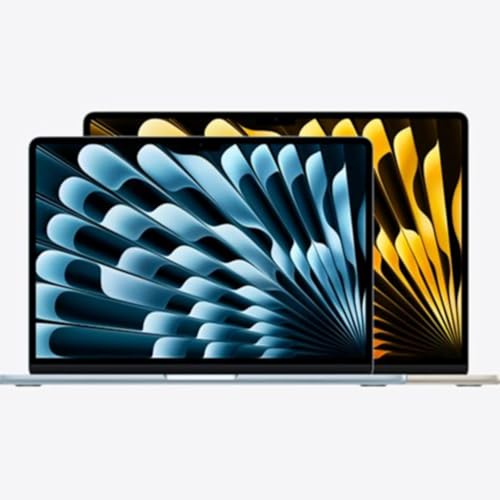
    In this episode, we’re talking about one of the most powerful thin and light laptops Apple has ever made — the MacBook Air M5.

    So what makes the MacBook Air M5 such a big deal? Let’s start with performance. This machine is powered by the new M5 chip, which is heavily optimized for AI. Apple claims it delivers up to 4 times faster AI processing compared to the M4, and nearly 10 times faster than the old M1. That means tasks like content creation, coding, or even running AI tools locally feel almost instant.

    And despite all that power, it still runs completely silent thanks to its fanless design. No noise, no distractions — just smooth performance.

    Now, if you’re someone who values portability, the Macbook Air M5 13 Inch is probably the sweet spot. It’s lightweight, easy to carry, and perfect for students, office workers, or digital nomads. You can literally take it anywhere and still have enough power for serious work.

    Battery life is another highlight. You’re getting up to 18 hours of usage, which means a full day of work without needing to charge. That’s a huge advantage if you’re always on the move.

    Storage is also improved this year. Apple now starts at 512GB by default, and the SSD is twice as fast as before. So opening apps, transferring files, or working with large data becomes much quicker and smoother.

    Let’s talk about the display. You get a Liquid Retina screen with 500 nits brightness and P3 color support. Whether you’re editing photos, watching content, or just browsing, everything looks sharp and vibrant.

    Another big upgrade is connectivity. With Wi Fi 7 and Bluetooth 6, the MacBook Air M5 is ready for the future. Faster speeds, more stable connections — especially useful if you rely on cloud work or online meetings.

    And speaking of meetings, the 12MP Center Stage camera keeps you perfectly framed during video calls, which is a small feature but makes a big difference in daily use.

    One more thing that really stands out is the ability to connect to two external displays at the same time. That basically turns this thin laptop into a full workstation setup.

    So who is this for? If you’re a professional, a content creator, or someone planning to keep a laptop for the next 5 to 6 years, the MacBook Air M5 is a very solid investment. It’s powerful, future ready, and still incredibly portable

    Alright, that’s it for today’s episode. If you found this helpful, make sure to follow the Manh Hao Podcast for more simple and practical tech content. See you in the next one.


    続きを読む 一部表示
    3 分
  • What you need to know about Macbook Neo
    2026/03/20

    Hey everyone, welcome back to the Manh Hao Podcast, where we talk about tech in a simple and practical way.
    Today, we’re checking out one of the most interesting laptops Apple has released recently — the MacBook Neo, especially the MacBook Neo 13 inch.
    So what makes this device special? First of all, price. This is officially one of the most affordable MacBooks Apple has ever made. And because of that, it’s clearly targeting students, office workers, or anyone who wants to try macOS without spending too much.
    Now let’s talk about performance. The MacBook Neo is powered by the A18 Pro chip — yes, the same chip line used in iPhones. It comes with a 6-core CPU, 5-core GPU, and a 16-core Neural Engine. In real use, that means smooth performance for daily tasks like browsing, working on documents, video calls, or even light content creation.
    And thanks to Apple Intelligence, you also get smart features like writing assistance, quick summaries, and even AI image editing right on the device.
    One thing I really like is the design. The MacBook Neo 13 inch is super lightweight, around 1.2 kg, with a clean aluminum body. It looks simple but still premium. Plus, it comes in multiple colors, which is great if you want something a bit more personal.
    The display is a 13-inch Liquid Retina screen. It’s sharp, bright at 500 nits, and supports a wide color range. Whether you’re studying, watching videos, or editing photos, it looks really good for the price.
    Battery life is another strong point. Apple claims up to 16 hours of use, and honestly, for everyday tasks, it can easily last a full day without needing a charger.
    Of course, to keep the price low, there are some trade-offs. For example, the base version doesn’t have Touch ID, and you only get basic USB-C ports. Also, it only supports one external display.
    But overall, the MacBook Neo is not trying to be a powerhouse. It’s designed to be a reliable, affordable, and easy-to-use MacBook for everyday users.
    So if you’re a student, a casual user, or someone entering the Apple ecosystem for the first time, the MacBook Neo 13 inch is definitely worth considering.
    That’s it for today’s episode. If you found this helpful, don’t forget to follow the Manh Hao Podcast for more content!
    See you in the next one!

    続きを読む 一部表示
    3 分
  • Who Should Buy the iPhone 17e?
    2026/03/13

    Hello everyone, welcome back to ManhHao Podcast. I'm your host, Manh Hao
    Today we’re going to talk about the new iPhone 17e from Apple again, but this time, let's answer the question: Who Should Buy the iPhone 17e?

    This model was introduced in early 2026 and it quickly stood out for one main reason: it offers many modern iPhone features, but at a much more approachable price compared to the rest of the lineup.

    At its core, the iPhone 17e runs on the A19 chip, the same generation of processor used in the standard iPhone 17. That means you still get strong performance for everyday tasks like gaming, social media, video streaming, or multitasking. The phone also supports Apple Intelligence features, which can help with things like summarizing text, editing content, or handling small AI tasks directly on the device.

    In terms of design, the phone keeps Apple’s familiar aluminum body and adds the new Ceramic Shield 2 glass on the front. This improves durability and helps reduce scratches, which is always a nice bonus for people who keep their phones for several years.

    Another highlight is storage. The iPhone 17e starts with 256GB and end with the iPhone 17e 512GB, which is plenty for most users. You can store photos, videos, apps, and documents without constantly worrying about running out of space.

    So who is this phone really for?

    First, it’s a great choice for students. The combination of strong performance, large storage, and a good camera makes it useful for taking photos of notes, recording lectures, or joining online classes.

    Second, it’s perfect for people switching to iPhone for the first time. Instead of jumping straight into expensive Pro models, the 17e gives you a modern iPhone experience at a lower cost.

    It’s also a solid upgrade for people using older devices. If you’re coming from something like an iPhone 11 or iPhone 12, the jump in performance, display quality, and battery efficiency will be very noticeable.

    The camera setup is simple but capable. The phone uses a 48-megapixel main camera that can capture detailed photos and supports 2x zoom through sensor cropping. It also records 4K Dolby Vision video, which is more than enough for everyday content creation.

    Overall, the iPhone 17e feels like a balanced device. It’s powerful enough for daily use, modern enough to last several years, and priced in a way that makes the Apple ecosystem more accessible.

    And for many users, that combination might be exactly what they need. Thanks for listening to Manh Hao Podcast, and I’ll see you in the next episode where we continue exploring interesting tech and devices.

    続きを読む 一部表示
    2 分
  • Comparing the new iPhone 17e vs iPhone 17
    2026/03/09

    Wassup everyone, welcome to another episode about the new iPhone 17e

    Both belong to the iPhone 17 generation, both run the same A19 chip, and both support Apple Intelligence. But the price difference between them is significant. So the real question is simple: which one actually gives you better value?

    Let’s start with the design.

    At first glance, the two phones share the same overall design language. Both use a durable aluminum frame combined with a glass back and the new Ceramic Shield 2 protection on the front. They also carry the IP68 rating for water and dust resistance.

    The camera layout is another easy way to tell them apart. The iPhone 17e keeps things simple with a single rear camera, while the iPhone 17 features a dual-camera system arranged vertically.

    Now let’s talk about the display, because this is where the experience really changes.

    The iPhone 17e comes with a 6.1-inch OLED display with a resolution of 2532 by 1170 pixels. It still delivers excellent colors, contrast, and brightness up to 1200 nits in HDR.

    But the iPhone 17 pushes things further with a larger 6.3-inch Super Retina XDR display and a resolution of 2622 by 1206 pixels. More importantly, it introduces ProMotion technology with an adaptive refresh rate up to 120Hz.

    That means smoother scrolling, smoother animations, and a noticeably more fluid experience overall. The iPhone 17 also includes Always-On display support, which the 17e does not.

    Performance, however, is where things become surprisingly similar.

    Both phones run on Apple’s A19 chip and include 8GB of RAM. That means they can handle demanding apps, games, and AI features with ease. Apple Intelligence tools such as writing assistance, image generation, and smarter Siri all run smoothly on both devices.

    The difference lies in the graphics performance. This iPhone uses a 5-core GPU, while the iPhone 17e has a slightly reduced 4-core GPU. For everyday tasks you probably won’t notice, but for heavier gaming or video rendering, the iPhone 17 does have the advantage.

    Storage starts at 256GB on both devices, but if you need more space for videos, photos, and large apps, options like the iPhone 17e 512GB configuration make the budget model more practical for long-term use.

    Now let’s move to the cameras.

    The iPhone 17e uses a single 48-megapixel Fusion camera. Even with one lens, Apple’s image processing allows it to produce sharp photos and support features like portrait photography and 2x optical-quality zoom.

    The iPhone 17, however, adds versatility with a dual-camera system. It includes the same 48-megapixel main camera plus a 48-megapixel ultra-wide lens, which is perfect for landscape shots or group photos.

    The front camera also gets an upgrade on the iPhone 17. It moves from the standard 12-megapixel TrueDepth camera on the 17e to an 18-megapixel camera with Center Stage support for better video calls.

    Both phones support 4K video recording at up to 60 frames per second, but the iPhone 17 adds Spatial Video recording for viewing content on devices like the Apple Vision Pro.

    Finally, let’s talk about battery and charging.

    The iPhone 17 has a slightly larger battery and can reach up to 30 hours of video playback. The iPhone 17e still performs well with up to 26 hours, which is more than enough for a full day of heavy use.

    So in the end, choosing between these two phones depends on your priorities.

    If you want the smoothest display, better cameras, and faster charging, the iPhone 17 clearly offers the more premium experience.

    But if your focus is strong performance, Apple Intelligence support, and a more affordable price, the iPhone 17e remains a very balanced option.

    Sometimes the smartest choice isn’t the most expensive one — it’s the one that fits how you actually use your phone.

    Thanks for listening, and I’ll see you in the next episode.

    続きを読む 一部表示
    6 分
  • The new iPhone 17e Specs Breakdown
    2026/03/09

    Hi every one, this is Manh Hao from Manh Hao Podcast

    Today we’re talking about a new iPhone that sits in an interesting position in Apple’s lineup — the iPhone 17e.

    Let’s break it down.

    Starting with the design, the iPhone 17e focuses on durability and simplicity. The front is protected by Ceramic Shield 2, which Apple says is up to three times more resistant to scratches compared to the previous generation. Combined with an aluminum frame and a color-infused glass back, the phone keeps that premium Apple look while remaining lightweight and sturdy.

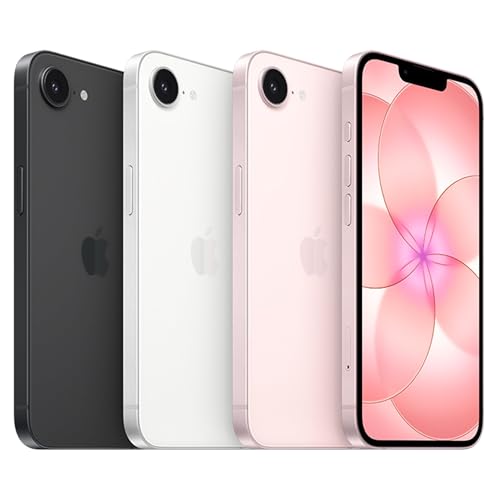
    It also comes in three colors: black, white, and a new soft pink option. And of course, it still carries the IP68 rating for water and dust resistance, which means it’s built to survive everyday accidents.

    Now let’s move to the display.

    The iPhone 17e features a 6.1-inch Super Retina XDR OLED display with a resolution of 1170 by 2532 pixels. Colors look vibrant thanks to the wide P3 color gamut, and the contrast remains excellent as you’d expect from Apple’s OLED panels.

    Brightness reaches 800 nits in normal conditions and up to 1200 nits for HDR content. One small but useful upgrade this year is a new seven-layer anti-reflective coating that helps reduce glare when you’re using the phone outdoors.

    Performance is powered by the new A19 chip, which uses a six-core CPU with two performance cores and four efficiency cores. This setup balances speed and battery life very effectively.

    Alongside that, the phone includes a 16-core Neural Engine designed to handle Apple Intelligence features and other AI tasks directly on the device. That means faster processing for things like photo recognition, writing tools, and smart suggestions across the system.

    Connectivity also gets a boost with the new C1X modem, which delivers significantly faster cellular speeds and better efficiency compared to the previous generation.

    Storage starts at 256GB this time, which is a big improvement compared to earlier entry models. For most people, that’s plenty of room for thousands of photos, 4K videos, apps, and games.

    Battery life is also solid. Apple claims up to 26 hours of video playback, which puts it in line with many flagship phones. When it’s time to recharge, the phone supports fast charging that can reach 50 percent in about 30 minutes with a 20-watt adapter.

    On the camera side, the iPhone 17e uses a 48-megapixel Fusion camera system. It works almost like two lenses in one. You can shoot high-resolution images or use the built-in 2x optical-quality zoom for tighter framing without losing detail.

    The camera performs well in low light thanks to the f/1.6 aperture and optical image stabilization. Portrait mode has also improved, allowing you to adjust focus points and background blur even after the photo is taken.

    For video, the phone supports 4K Dolby Vision recording at up to 60 frames per second. Features like Cinematic mode, QuickTake recording, and improved audio processing help make videos look and sound more professional.

    Speaking of audio, Apple includes stereo recording and spatial audio support, which makes playback more immersive when watching or sharing content.

    The iPhone 17e runs on iOS 26 and fully supports Apple Intelligence. That includes features like visual search, smart writing tools, and photo editing tools such as Clean Up, which can remove unwanted objects from images.

    Siri also becomes more context-aware and responsive, helping you complete tasks faster across apps.

    For connectivity and safety, this iPhone supports both nano-SIM and eSIM, along with 5G, Wi-Fi 6, and Bluetooth 5.3. Apple’s satellite features are also included, such as Emergency SOS and roadside assistance when you’re outside cellular coverage.

    So overall, the iPhone 17e is a balanced device.

    For users who want a powerful, modern iPhone without paying flagship prices, the iPhone 17e might actually be the smartest pick in the lineup.

    Thanks for listening, and I’ll see you in the next episode.

    続きを読む 一部表示
    5 分
  • Is iPad Air M4 60Hz Enough Without 120Hz in 2026?
    2026/03/05

    Wassup everyone, welcome back to the podcast.

    In this episode, we will focus on one very specific question I’ve been seeing everywhere:

    How many Hz is the iPad Air M4 display?

    And more importantly… does it have 120Hz?

    Let’s get straight to it.

    The iPad Air M4 runs at 60Hz.

    Yes. Standard 60Hz.

    No ProMotion.

    No 120Hz adaptive refresh rate.

    And for some people, that’s immediately disappointing. Because in 2026, we’re used to seeing 120Hz on premium devices.

    So why didn’t Apple bring it to the Air?

    Simple answer: product separation.

    Apple keeps ProMotion — the 120Hz adaptive display technology — exclusive to the iPad Pro lineup. It’s one of the key features that defines the Pro tier.

    The Air sits right below that. Powerful, flexible, but intentionally not “fully Pro.”

    Now here’s the more important question:

    Does 60Hz actually feel slow on the iPad Air M4?

    For most people — no.

    Scrolling feels smooth.

    Animations feel fluid.

    Apple Pencil input is responsive.

    And that’s largely because iPadOS is extremely optimized. The M4 chip is powerful enough that even at 60Hz, everything feels stable and consistent.

    This isn’t a budget panel. It’s still a high-quality Liquid Retina display.

    You’re getting:

    Wide P3 color

    True Tone

    Anti-reflective coating

    500 nits brightness on the 11-inch

    600 nits on the 13-inch

    That 600 nits on the larger model is especially useful outdoors or in bright environments.

    So while the refresh rate didn’t increase, brightness and color performance remain strong for its category.

    Now, let’s talk about who actually needs 120Hz.

    If you’re a digital artist doing high-speed strokes with Apple Pencil.

    If you’re editing video frame-by-frame.

    If you’re extremely sensitive to motion smoothness.

    That’s where ProMotion on the iPad Pro makes a difference. The adaptive 120Hz refresh rate makes scrolling, drawing, and animation feel more immediate and more natural.

    But if you’re:

    A student taking notes

    A professional writing documents

    Someone watching Netflix

    Browsing, multitasking, light editing

    60Hz is completely fine.

    In fact, many users wouldn’t notice the difference unless they directly compared devices side by side.

    And remember — higher refresh rates also consume more power. By staying at 60Hz, the iPad Air M4 maintains strong battery efficiency, especially paired with the M4 chip.

    So the decision really comes down to this:

    Do you prioritize AI performance, long-term memory headroom, and value?

    Or do you prioritize maximum display fluidity above everything else?

    If display smoothness is your number one concern, the iPad Pro is still the answer.

    But if you’re asking whether the iPad Air M4 feels slow because it’s 60Hz — it doesn’t.

    Apple chose to upgrade performance, RAM, and connectivity this year instead of the refresh rate.

    And for most buyers in this price range, that was probably the smarter trade-off.

    So to wrap it up:

    iPad Air M4 = 60Hz

    No 120Hz ProMotion

    But still one of the best-balanced displays in its segment.

    Sometimes it’s not about chasing bigger numbers.

    It’s about where those upgrades actually matter.

    Thanks for listening, and I’ll see you in the next episode.

    続きを読む 一部表示
    4 分
  • Comparing the iPad Air M4 vs iPad Air M3
    2026/03/05

    Hello everyone, welcome back to ManhHao Podcast

    In this episode we’re doing something practical. Not flashy. Not dramatic. Just a real-world question:

    If you bought the iPad Air M3 last year…

    is the iPad Air M4 enough of an upgrade to matter?

    Because on the outside? They look identical.

    Same slim 6.1mm aluminum body.

    Same 11-inch and 13-inch options.

    Same Liquid Retina display with 500 nits on 11-inch and 600 nits on 13-inch.

    So where’s the difference?

    Let’s start with performance.

    The M3 chip was already fast. For students, creators, casual editing, multitasking — it handled everything smoothly.

    But the M4 steps things up by around 30% in overall performance, at least according to Apple. The CPU remains 8-core, the GPU 9-core, but the architecture improves efficiency and graphics processing.

    What does that actually mean?

    If you’re editing 4K video, working with large Photoshop files, or playing graphics-heavy games, you’ll feel smoother sustained performance. Hardware-accelerated ray tracing and mesh shading on the M4 also bring more advanced visual effects into reach.

    But here’s the real shift: AI.

    The M4 iPad Air jumps from 8GB to 12GB of unified memory — a 50% increase. That matters more than the raw chip speed.

    Apple Intelligence features, background AI tools, subject detection, image cleanup — these need memory to sit and wait without forcing apps to reload.

    With 8GB on the M3, the system manages.

    With 12GB on the M4, it breathes.

    If you’re someone who multitasks heavily or plans to keep your device for three to four years, that RAM bump is the quiet long-term advantage.

    Now let’s talk connectivity.

    The M3 supports Wi-Fi 6E and Bluetooth 5.3.

    The M4 introduces Apple’s custom N1 chip with Wi-Fi 7 and Bluetooth 6. That means faster throughput, lower latency, and better stability — especially as Wi-Fi 7 routers become more common.

    On the cellular side, the M4 uses Apple’s new C1X modem. It’s up to 50% faster in data performance and around 30% more power efficient compared to the M3’s modem.

    So if you rely on mobile data often, this isn’t a small improvement.

    And that’s where choosing the right version matters.

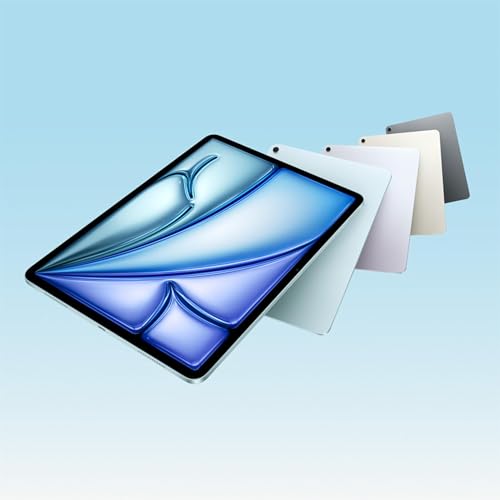
    If you want maximum screen space for creative work, the iPad Air M4 13 inch becomes the sweet spot for productivity — especially paired with Magic Keyboard.

    But if you work remotely, travel frequently, or need reliable high-speed data anywhere, the iPad Air M4 13 inch 5G configuration makes much more sense. The improved modem and network efficiency really show up in daily use.

    Now, what hasn’t changed?

    The display tech is still Liquid Retina IPS — no ProMotion here.

    Both support Apple Pencil Pro and Magic Keyboard.

    Both offer similar color options and ultra-thin design.

    So visually and physically, they feel the same.

    Which brings us to the big question:

    Who should upgrade?

    If you already own the M3 and your workload is light — browsing, note-taking, streaming — there’s no urgent reason to switch.

    But if you’re a creator handling larger files, someone excited about on-device AI, or planning to keep your iPad long-term, the M4 version is clearly more future-proof.

    It’s not a revolutionary redesign.

    It’s a strategic upgrade:

    More memory.

    Stronger AI processing.

    Faster Wi-Fi.

    Better cellular efficiency.

    And in 2026, those quiet upgrades matter more than flashy design changes.

    So the choice isn’t about what looks newer.

    It’s about how long you want your iPad to stay fast.

    Thanks for listening. I’ll see you in the next episode.

    続きを読む 一部表示
    5 分